
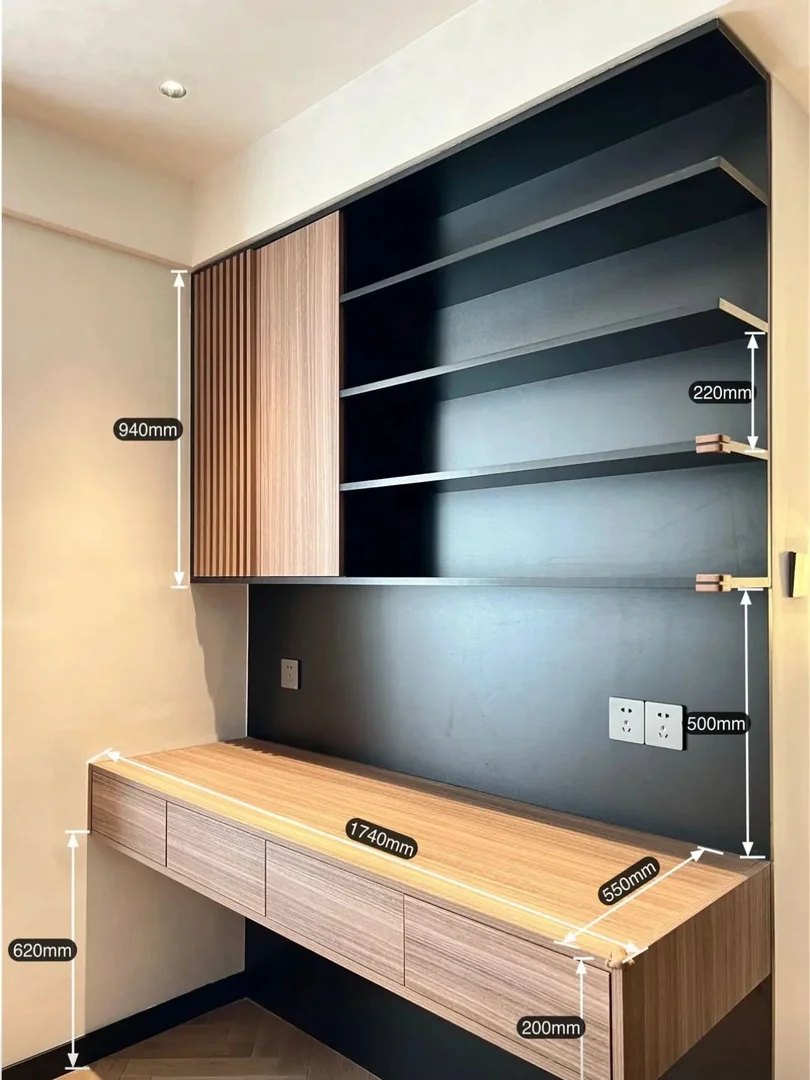
Measure the Room Before Choosing Desk Dimensions
A built-in study table should begin with the room, user and equipment rather than a standard online dimension. Measure the full wall width, floor-to-ceiling height, skirting, window ledge, door swing, curtain track and the position of nearby wardrobes or beds. Record uneven corners and wall projections because a cabinet may need fillers or a scribed edge.
Mark the proposed desk depth and chair position on the floor. In a small HDB bedroom, a desk can fit the wall but still leave too little space to pull out the chair or pass the bed. Check the walkway with drawers open and with the room door in use. If two people will work together, measure both chairs and the equipment each person needs.
Use final site measurements after relevant flooring, wall panels or plastering are known. The HDB floor plan helps with early planning but is not a fabrication measurement. Ask for a dimensioned elevation and plan view before approving production.
- Measure finished wall conditions
- Mark desk and chair depth on the floor
- Approve a plan and front elevation
Set a Comfortable Desk Height and Depth
Many study desks are planned around a worktop height near 720 to 750 mm, but the right result depends on the user, chair and worktop thickness. A child, tall adult or wheelchair user may need a different arrangement. Test the intended chair and keep enough clear knee height after drawers, support rails and cable trays are included.
A depth around 500 to 600 mm may suit a laptop and writing, while larger monitors, stands or drawing work can require more. A shallow desk can push screens too close; an unnecessarily deep desk can reduce the bedroom aisle. Measure the monitor base, keyboard, books and desk lamp, then select the depth around the actual setup.
- Test the user's chair and posture
- Protect clear knee space
- Size depth around actual equipment
Plan Width for One or Two Workstations
Desk width should account for the user zone, drawers and side panels, not only the overall wall length. A single workstation needs room for the screen, writing area and frequently used items without placing everything in one narrow strip. For two users, divide the worktop according to equipment and dominant hand rather than assuming equal compartments will work.
Long floating spans need suitable support and material selection. Drawers or side panels can support the top, but their positions must not block knees or chair movement. Ask the supplier to show structural supports on the drawing and confirm whether a central leg, concealed bracket or cabinet is required. Do not remove a support later simply for appearance.
- Separate user and drawer widths
- Check chair movement for both users
- Confirm support for long spans
Size Drawers Around What They Will Store
A slim drawer bank can hold stationery, chargers and documents, but the external drawer height does not equal the usable internal space. List the objects to be stored and ask for the internal dimensions. Deep drawers may suit files or devices but can reduce knee clearance when installed directly beneath the worktop.
Check that drawers open without hitting the chair, bed or room door. Handles, finger pulls and push-to-open systems affect appearance and daily use. If equipment is charged inside a drawer, plan ventilation and safe cable access rather than running a loose extension through a closing front. Keep frequently used items within comfortable reach.
- Check usable internal drawer sizes
- Open drawers on the plan
- Plan safe charging access
Coordinate Shelves and Wall Cabinets
Open shelves above a desk should be high enough to avoid head contact but low enough for the intended user to reach safely. Measure books, files, models and display pieces before fixing shelf spacing. A shelf around 200 to 250 mm deep may suit many books, but heavier items and longer spans need suitable thickness and support.
Wall cabinets provide dust-controlled storage but can make the desk feel enclosed if they are too deep or low. Draw each door in its open position and check the user's head, monitor and lamp. Integrated lighting can improve the work surface, provided the strip, diffuser, switch and driver access are planned before fabrication.
- Measure shelf contents
- Protect head and monitor clearance
- Keep lighting drivers accessible
Map Sockets, Data and Cable Routes
Photograph every socket, data point and switch before design approval. Count the laptop charger, monitor, lamp, printer, router and other devices that may be used together. A socket hidden behind drawers or a fixed backing is not useful, while one directly above the worktop may interfere with a monitor or shelf.
Agree on cable openings that are large enough for plugs, a route below or behind the desk and access for future changes. Electrical relocation should be handled separately by the appropriate trade where required. If the desk shares a wall with air-conditioning piping or other concealed services, identify those constraints before drilling or installation.
- Count devices used together
- Plan plug-sized cable openings
- Keep service points reachable
Compare Materials, Cost and Lead Time
Study-table cost depends on length, depth, worktop thickness, drawer quantity, wall cabinets, open shelves, backing panels, lighting, hardware and site access. Electrical work, painting, wall repair, chair supply and moving existing furniture may be separate. Compare quotations against the same drawing and written specification instead of only a per-foot price.
Review physical laminate and hardware samples under the room's lighting. Record material codes, edge treatment and drawer-runner type. The process normally includes estimate, site measurement, drawing revision, finish approval, production and installation. Custom furniture may require around six weeks after final confirmation, subject to factory schedule, shipping and complexity.
- Compare identical specifications
- Record finish and hardware codes
- Allow production and adjustment time
FAQ and What to Send for a Quote
What is the best desk height? There is no single height for every user; test the chair, worktop and knee clearance together. Is 500 mm depth enough? It may suit compact laptop use, but monitor size and working style can require more. Can shelves be added later? Sometimes, but concealed wiring, backing and support are easier to coordinate before fabrication.
Send the HDB floor plan, full-wall photos, wall width and ceiling height, window and door positions, user height, chair dimensions, equipment list, socket locations, storage requirements and preferred finishes. Include the renovation schedule and any furniture that must remain. WhatsApp Glee Deco & Furniture at +65 8742 6767 for a project-specific study-table quotation.
- Send wall and socket photos
- List chair and equipment dimensions
- WhatsApp +65 8742 6767 for a quote